Currently there are no notifications.
FAQ
Here you will find answers to the most frequently asked questions about orders, quotations, deliveries, payment methods, the MyMISUMI customer portal and much more.
You can view all entries on a particular topic by clicking on a category
Can I have my goods delivered to a private address?
As a B2B company, MISUMI can only deliver to registered companies or universities. Deliveries to private and home-office/remote-work addresses, as well as deliveries to post boxes, parcel shops, self-storage hubs and hotel addresses are not possible.
What are the delivery times at MISUMI?
For delivery times, we differentiate between stock items and items that are ordered from our suppliers. Stock items ordered Mon-Thu by 4 pm or Fri by 3 pm (CET) will usually be dispatched on the same day. Items that we do not have in stock or items that are configured and manufactured on demand have a longer delivery time, which also depends on the production capacities of our suppliers. Deliveries outside Germany will have a longer delivery time, you can find more information in the FAQ. On our website, you will find a non-binding overview of delivery times when you have selected a product. The actual delivery date of your order is shown in your order confirmation.
What do I do if only part of the goods have arrived?
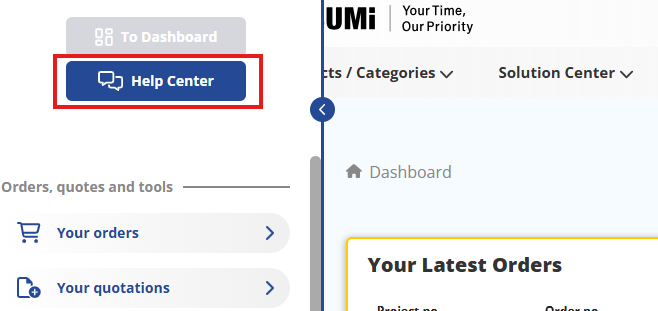
In rare cases, goods of an order may arrive in different packages. The number of packages used to ship your order is stated on the last page of the delivery note. In case you have not received all packages stated on the delivery note, please wait another working day to see if the missing package arrives later. As an order can have multiple delivery dates, please check your order confirmation to ensure that all items have been confirmed and to find the delivery date for your missing item. In case you have received all packages, but an item stated on the delivery note, is not included, please report this via the Help Center in your MyMISUMI portal.
Who can order from MISUMI?
Officially registered companies, traders and educational institutions can place orders with MISUMI. To place orders, you must be registered as a Corporate User. Enquires and orders from private individuals cannot be processed.
How can I order from MISUMI?
As a registered MISUMI customer, you can place your order via the online shop:
- Log in to your MISUMI account
- Then go to the MISUMI main page and click on the yellow ‘Ouote/Order’ button
- Enter the necessary data: Part numbers, quantity, etc. and add the items to the shopping cart
- Select the ‘Go to order’ option in the shopping basket
- In the next step, check the address data for the billing & delivery address
- Place your order in the next step.
You will then receive your order confirmation as a PDF file by email and can also view it in your order history in the MyMISUMI customer portal after a short transmission time.
Are discounts available at MISUMI?
With MISUMI, you will receive a quantity discount on your item depending on the quantity ordered. You can see the discounts for the individual products on the respective product page of the items in the online shop, if available.
Please be aware that MISUMI does not provide resale discounts.
Can I change my order?
Yes, you can amend your order in our MyMISUMI customer portal, using the self-cancellation function (if the order or line item is eligible)
- Log in to your MyMISUMI profile
- Select an order from your Order Overview
- In the Order Detail View click 'Modify / Cancel Order'
- Select all or single line items, you wish to amend
- Amend either the PO Reference, shipping address or shipping date
See tutorial video below.
Amendments made on the MyMISUMI customer portal will not have to be verified by our Customer Services and will be effective immediately
Currently, you can only change online orders, which you have placed yourself.
Orders can be amended online, only if the order or line item meets the defined eligibility criteria (see Cut-Off times below).
Cut-Off Times
| Modification / Item | Stock Item | MTO Item (Made-to-order) |
|---|---|---|
| Customer PO Reference | 10pm day before Shipping Date | 10pm day before Shipping Date |
| Delivery Address (incl. Attention-to) | 10pm day before Shipping Date | within 2hrs after placing the Order |
| Customer PO Item Reference | 10pm day before Shipping Date | 10pm day before Shipping Date |
| Shipping Date (sooner) | 10pm day before NEW Shipping Date | N/A |
| Shipping Date (postpone) | 10pm day before Shipping Date | within 2hrs after placing the order |
Can I request express shipping?
MISUMI offers express shipping for deliveries within Germany and Europe.
Most deliveries within Germany, arrive the next working day. For express deliveries within Europe, delivery times vary from country to country, but generally arrive in one to two working days. The respective delivery time to your country and the increase in shipping costs can be found on the shipping costs/delivery time overview in the FAQ. During the online order process, you can choose standard or express delivery via the corresponding button. Please note that express delivery is not available on Saturdays. In case a Saturday delivery is required, please contact us through our Help Center in your MyMISUMI Profile:
- Log in to your MyMISUMI-profile
- Go to Help Center
- Provide detailed information about the relevant order/item
Where do I submit a claim?
Send us your claim via the MyMISUMI customer Portal:
- Log in to your MyMISUMI-profile
- Go to "Claims and Returns" in the menu bar on the left side under category "Services"
- Select the category "Claims"
- In the drop down menu, please select the relevant order
- Fill in the form.
You will find different categories (incorrect goods, incorrect quantity, missing goods, shipment not received, invoice-related, quality-related). Mark the faulty item and send us a detailed description of the fault. For quality related claims, please also include a photo and detailled issue description.
How can I return goods in case of an incorrect delivery from MISUMI?
If an incorrect product has been delivered to you, you can report this via the MyMISUMI customer portal:
- Log in to your MyMISUMI-profile
- Go to "Claims and Returns" in the menu bar on the left side under category "Services"
- Select the category 'Return Goods'
- In the drop down menu, please select the relevant order
- Fill in the form.
Your request will be checked, incorrect delivered products will be replaced as soon as possible and the incorrect delivery will be collected. Please provide the following information: the number of incorrectly delivered parcels, their weight and size, the collection address, a contact name and contact phone number. We will take care of the next steps and get back to you with more information on your return. Please do not return the goods to us before our Customer Service team has confirmed your request.